
Download Feedback Navigator – AI‑Powered Feedback Analysis Tool
Overview
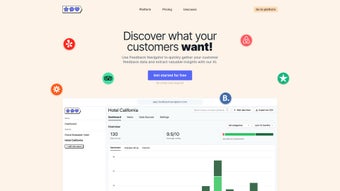
Feedback Navigator is a cloud‑native, AI‑driven platform that transforms raw customer commentary into clear, actionable business intelligence. Designed for hospitality operators, fitness chain managers, product development teams, and any organization that relies on user‑generated feedback, the tool aggregates reviews from major public sites such as Trustpilot, Booking.com, and Yelp, while also supporting CSV uploads and custom API integrations for internal surveys or proprietary comment streams. Once data is ingested, sophisticated natural‑language processing models evaluate each entry, assigning a sentiment score (positive, neutral, or negative) and flagging recurring requests such as “add vegan menu options” or “improve Wi‑Fi reliability.” The resulting dashboard offers a real‑time heat‑map of sentiment trends, a ranked list of the most common suggestions, and a source‑by‑source performance breakdown.
For teams that need automation, Feedback Navigator includes webhook‑based workflow designers that can push new negative reviews to Slack, trigger email alerts, or create tickets automatically in popular help‑desk solutions. Export capabilities cover CSV, JSON, and direct connections to BI tools like Power BI or Tableau, ensuring that deeper statistical analysis is always within reach. A 14‑day free trial provides unrestricted access to the core feature set, while tiered subscription plans scale with the volume of feedback processed, making the solution affordable for startups and enterprise‑level businesses alike.
In short, Feedback Navigator eliminates the manual slog of scrolling through endless comment threads, delivering instant insights that empower decision‑makers to prioritize improvements, boost customer satisfaction, and drive revenue growth.
Key Features and Core Capabilities
- Multi‑Source Import: Direct connectors for Trustpilot, Booking.com, Yelp, CSV files, and a generic RESTful API for custom data pipelines.
- AI Sentiment Analysis: Real‑time classification of feedback into positive, neutral, or negative categories with confidence scores and visual heat‑maps.
- Request Detection Engine: Automatic identification and clustering of common customer requests, feature suggestions, and pain points.
- Customizable Dashboards: Drag‑and‑drop widgets let users build personalized views of sentiment trends, top requests, and source performance.
- Webhook Automation: Create rule‑based workflows that push alerts to Slack, email, or ticketing systems when specific conditions are met.
- Bulk Export & Integration: Export filtered datasets to CSV, JSON, or connect directly to Power BI, Tableau, and other BI platforms.
- Role‑Based Access Control: Granular permission settings for analysts, managers, and executives to protect sensitive data.
- Multi‑Language Support: AI models trained on 12 major languages, enabling global businesses to analyze feedback in native tongues.
- Security & Compliance: GDPR‑ready architecture, TLS 1.2+ encryption, regular third‑party security audits, and data residency options.
- Scalable Pricing & Free Trial: 14‑day trial with unlimited feedback volume; paid plans start at $19 / month and scale with review count.
Each of these capabilities is engineered to reduce the manual effort traditionally associated with feedback analysis. The sentiment engine, for example, can process tens of thousands of reviews in a matter of minutes, instantly generating a color‑coded heat‑map that highlights problem areas across locations or product lines. The request detection engine groups similar suggestions, revealing that “add a loyalty program” appears in 12 % of recent comments, allowing product managers to prioritize development road‑maps with data‑backed confidence. Customizable dashboards enable non‑technical users to build visual reports without writing a single line of code, while the webhook automation feature ensures that critical insights trigger immediate action—be it a Slack notification to the support team or an auto‑generated ticket in Zendesk. Together, these features form a cohesive ecosystem that not only surfaces insights faster but also embeds them directly into existing workflows, turning raw commentary into a strategic asset.
Installation, Setup, and Daily Usage
Because Feedback Navigator is a fully hosted SaaS solution, there is no software to download or install on local machines. Getting started is a matter of creating an account and connecting your data sources, after which the platform handles all processing in the cloud. Follow these steps to launch your first analysis project and integrate the tool into your daily operations:
- Create Your Account: Visit the official website, click “Start Free Trial,” and fill in your business email. A verification link is sent to your inbox; clicking it activates your account.
- Connect Data Sources: Inside the dashboard, navigate to the “Integrations” tab. Choose a pre‑built connector (Trustpilot, Booking.com, Yelp) and follow the OAuth flow to grant access. For CSV uploads, simply drag the file onto the upload zone; for custom APIs, paste the endpoint URL, authentication token, and map the JSON fields to the platform’s schema.
- Configure AI Settings: Select the languages you expect in the feedback, set a sentiment confidence threshold (the default of 0.75 works for most cases), and enable the request detection module. Advanced users can also upload custom lexicons to fine‑tune keyword recognition.
- Run the First Import: Click “Start Import.” The system fetches the data, runs the AI models, and populates the “Overview” tab with sentiment scores, request tags, and source breakdowns. Processing time varies with volume, but most small‑to‑medium datasets complete within minutes.
- Design Automated Workflows: Go to the “Automation” section, create a new webhook, and select a trigger such as “New Negative Review.” Define the destination URL (e.g., a Slack webhook) and map payload fields like review text, rating, and source. Save and activate the workflow to receive real‑time alerts.
- Explore and Customize Dashboards: Use the drag‑and‑drop builder to add visual components: a line chart for “Sentiment Over Time,” a bar graph for “Top 10 Requests,” and a geo‑map for location‑based sentiment. Filters allow you to slice data by date range, product line, or region, giving you granular insight whenever you need it.
- Export & Share Findings: When preparing reports for stakeholders, click “Export CSV,” select the columns you require (sentiment, request tags, raw text, etc.), and download the file. You can also generate a shareable, read‑only link that provides instant access to the live dashboard without requiring a login.
- Leverage API for Advanced Integration: For teams that run their own data pipelines, the API documentation offers endpoints for programmatic imports, custom model training, bulk webhook management, and retrieval of analytical results. This enables seamless embedding of Feedback Navigator insights into internal analytics platforms or custom dashboards.
The user interface follows modern design conventions, featuring a clean sidebar, contextual tooltips, and responsive layouts that adapt to any screen size. Even users with limited technical expertise can navigate the platform effortlessly, while power users benefit from the extensive API and webhook capabilities. Ongoing support includes a searchable knowledge base, step‑by‑step video tutorials, and live chat assistance during business hours, ensuring that any roadblocks are resolved quickly. By the end of the first week, most teams report a dramatic reduction in time spent manually reviewing comments and a noticeable increase in the speed at which insights are turned into concrete actions.
Compatibility, Pros & Cons
Feedback Navigator runs entirely in the browser, making it compatible with any modern operating system that supports HTML5 and JavaScript. This includes Windows 10/11, macOS Monterey and later, popular Linux distributions, as well as mobile browsers on Android 9+ and iOS 13+. No additional plugins, desktop clients, or VPNs are required, which simplifies deployment across mixed‑device environments and reduces IT overhead.
Pros
- All‑in‑one platform: import, analyze, automate, and export without needing separate tools.
- Continuously updated AI models improve accuracy and keep pace with evolving language patterns.
- Scalable pricing model accommodates startups, mid‑size firms, and large enterprises alike.
- Extensive integration options minimize manual data handling and streamline workflows.
- Role‑based permissions and GDPR‑ready architecture protect sensitive customer data.
- Responsive web UI works on desktops, tablets, and smartphones, ensuring accessibility for remote teams.
Cons
- Requires a stable internet connection; offline analysis is not supported.
- Advanced customizations, such as training bespoke AI models, demand developer expertise.
- Initial setup of complex webhook workflows may present a learning curve for non‑technical users.
- Large‑scale data imports can incur higher processing times during peak usage periods.
Overall, the advantages of rapid insight generation, automated alerting, and multi‑source flexibility far outweigh the minor drawbacks. Organizations already invested in cloud‑based collaboration tools (Slack, Microsoft Teams, Zendesk, HubSpot) will find the webhook integration particularly valuable, as it creates a seamless feedback loop that accelerates response times and reduces manual effort. For teams that prioritize data security and compliance, the platform’s GDPR‑focused design and end‑to‑end encryption provide the confidence needed to handle sensitive customer information at scale.
Frequently Asked Questions
Can I import feedback from platforms that are not listed in the native connectors?
Yes. Feedback Navigator supports CSV uploads and a generic REST API connector, allowing you to bring in reviews from niche sites, internal surveys, or proprietary applications. You simply map the incoming fields to the platform’s standard schema during the import setup.
How does the sentiment analysis handle sarcasm or mixed emotions?
The underlying transformer model has been trained on millions of real‑world examples, including sarcastic and ambivalent language. While no AI can achieve 100 % accuracy, the confidence threshold (default 0.75) helps filter out ambiguous cases. Users can manually re‑classify low‑confidence reviews directly in the UI.
Is my data secure and GDPR‑compliant?
All data is transmitted over TLS 1.2+ encryption, stored in encrypted databases, and processed in EU‑based data centers to meet GDPR requirements. You can also request complete data deletion at any time via the account settings.
Can I set up automated alerts for specific keywords?
Absolutely. In the “Automation” tab you can create webhook triggers based on custom keyword matches such as “wifi,” “parking,” or “breakfast.” When a new review contains the defined keyword, the system sends the configured payload to your chosen endpoint (Slack, email, ticketing system, etc.).
What happens after the free trial ends?
Your account automatically transitions to a paid subscription unless you cancel before the trial expires. All data collected during the trial period is retained, so you can continue analysis without interruption. Paid plans start at $19 / month for up to 5,000 reviews, with higher tiers available for larger volumes.
Conclusion & Call to Action
Feedback Navigator bridges the gap between noisy customer commentary and strategic decision‑making by leveraging cutting‑edge AI to surface sentiment, recurring requests, and actionable trends in minutes rather than days. Its browser‑based architecture ensures instant accessibility on any device, while the extensive integration library and webhook automation empower teams to embed insights directly into existing workflows. Whether you manage a handful of boutique hotels or a global product portfolio, the platform scales with your data volume and analytical depth requirements, delivering consistent, reliable intelligence that drives customer satisfaction, repeat business, and product innovation.
If you’re ready to transform endless review streams into clear, data‑driven improvements, start your free trial today. Experience how real‑time sentiment dashboards, automated alerts, and seamless exports can accelerate your feedback loop, boost operational efficiency, and give you a competitive edge in a crowded market. With transparent pricing, robust security, and a user‑friendly interface, Feedback Navigator is the smart choice for businesses that want to listen, learn, and act—fast.
Pros: Multi‑source import, accurate AI sentiment, powerful automation, intuitive dashboards.
Cons: Requires constant internet connectivity, initial learning curve for advanced webhook setups.



.png)



